At the core of cloud computing lies a powerful technology called virtualization. It is the foundation that enables cloud providers to deliver scalable, flexible, and cost-effective services.
Without virtualization, cloud computing as we know it wouldn’t exist. This guide explains virtualization in cloud computing, how it works, its types, and real-world examples to help you understand it clearly.
What Is Virtualization in Cloud Computing?
Virtualization is the process of creating virtual versions of physical resources such as servers, storage devices, networks, or operating systems.
Instead of using a single physical machine for one task, virtualization allows multiple virtual machines (VMs) to run on a single physical system, each acting independently.
This is achieved using software called a hypervisor.
How Virtualization Works
Virtualization works through a layer called the hypervisor, which sits between the hardware and the operating system.
Steps Involved:
- A physical server is installed with a hypervisor
- The hypervisor divides the server into multiple virtual machines
- Each VM runs its own operating system and applications
- Resources like CPU, memory, and storage are shared efficiently
This allows better utilization of hardware and improved performance.
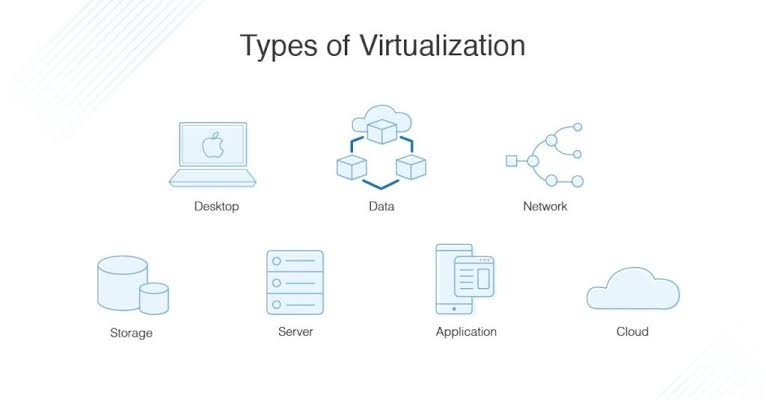
Types of Virtualization
1. Server Virtualization
Divides a physical server into multiple virtual servers.
- Widely used in cloud data centers.
2. Storage Virtualization
Combines multiple storage devices into a single virtual storage unit.
- Improves data management and scalability
3. Network Virtualization
Creates virtual networks independent of physical hardware.
- Enables flexible and secure network configurations
4. Desktop Virtualization
Allows users to access desktops remotely via the cloud.
- Used in remote work environments
5. Application Virtualization
Runs applications in isolated environments without installing them directly on devices.
Benefits of Virtualization in Cloud Computing
1. Efficient Resource Utilization
Maximizes the use of physical hardware by running multiple VMs.
2. Cost Savings
Reduces the need for additional hardware and maintenance.
3. Scalability
Easily create or remove virtual machines as needed.
4. Improved Disaster Recovery
VMs can be backed up and restored quickly.
5. Flexibility and Isolation
Each VM operates independently, improving security and performance.
Real-World Examples of Virtualization
1. Cloud Service Providers
Platforms like AWS, Microsoft Azure, and Google Cloud use virtualization to provide virtual machines and scalable infrastructure.
2. Web Hosting Services
Hosting providers run multiple websites on a single physical server using virtual machines.
3. Enterprise IT Infrastructure
Companies use virtualization to manage servers, storage, and networks efficiently within their data centers.
4. Virtual Desktop Infrastructure (VDI)
Organizations provide employees with remote desktops accessible from anywhere.
5. Software Testing and Development
Developers use virtual environments to test applications without affecting the main system.
Best Practices for Using Virtualization
1. Choose the Right Hypervisor
Select reliable virtualization software based on your needs.
2. Monitor Resource Usage
Avoid overloading physical servers.
3. Ensure Strong Security
Isolate VMs and use proper access controls.
4. Backup Regularly
Protect virtual machines with frequent backups.
5. Optimize Performance
Allocate resources efficiently to each VM.