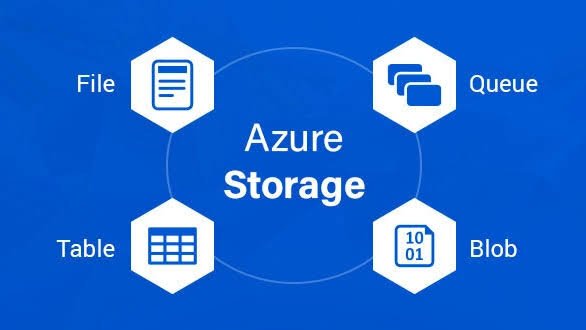
Azure Storage provides durable, scalable cloud storage services optimized for different data types and workloads, including Blob Storage for unstructured objects, File Storage for shared SMB/NFS shares, and Disk Storage for high-performance VM block storage.
All services offer 99.9%-99.99% durability via geo-redundant options (LRS, GRS, ZRS), encryption at rest, and integration with Azure AD for access control, building on prior guides for VMs, AKS, and DevOps.
Digital marketers and cloud security pros use these for SEO analytics datasets, content backups, or secure app storage in hybrid setups across India and the UAE markets.
Blob Storage Explained
Azure Blob Storage stores massive amounts of unstructured data like images, videos, logs, JSON, or backups as objects in containers, accessed via HTTP/HTTPS REST APIs or SDKs.
Three blob types: Block Blobs (195 TiB max, ideal for streaming), Append Blobs (logs), Page Blobs (VHDs up to 8 TiB). Access tiers: Hot (frequent), Cool (infrequent), Archive (rare), optimize costs, with up to 500 req/sec per blob.
Perfect for data lakes, media serving, or DevOps artifacts; scales to petabytes without downtime.
File Storage (Azure Files) Explained
Azure File Storage delivers fully managed SMB/NFS file shares mountable across VMs, on-premises, or containers, mimicking traditional file servers with hierarchical directories up to 100 TiB per share.
Supports multi-protocol access (SMB 3.0+, NFS 4.1), Azure File Sync for hybrid, and Premium tiers for low-latency workloads like shared configs or lift-and-shift apps. Max 4 TiB per file, 10,000+ IOPS/share.
Ideal for collaborative tools, CI/CD shares in Azure DevOps, or WordPress media libraries accessible by multiple AKS pods.
Disk Storage Explained
Azure Disk Storage offers high-performance block storage attached to VMs as OS/data disks, using page blobs under the hood but optimized for random I/O with types: Ultra Disks (64 TiB, 160k IOPS), Premium SSD (sub-ms latency), Standard SSD/HDD.
Managed disks snapshot, resize online, and zone-redundant for HA; max 65k GiB for ultra, up to 20k IOPS/disk. Ephemeral disks provide temp fast storage on the host.
Essential for databases, transaction apps on VMs/AKS nodes, or high-throughput SEO data processing.
Blob vs File vs Disk: Key Differences
Blob Storage excels in scalability and cost for unstructured data accessed via APIs, without file system semantics. File Storage provides familiar SMB/NFS sharing across machines, suited for structured files needing concurrent access.
Disk Storage prioritizes low-latency block I/O for single-VM persistence and is not natively shareable. Blob Storage offers virtually unlimited scalability at a lower cost, while File Storage balances shareability with moderate pricing. Disk Storage is performance-focused and typically the most expensive option.
All integrate with Azure Backup, but Blob suits cold archives, Files hybrid sync and Disks VM-level resilience.
Performance and Scalability Comparison
Blob handles sequential reads (500 req/sec/blob, petabyte scale) with tiered throughput. Files deliver 10k+ IOPS/share in Premium, scaling via multiple shares. Disks hit 160k IOPS/20k MBps in Ultra for VM-bound workloads.
Blob: Massive parallelism. Files: Multi-client consistency. Disks: Sub-ms latency for transactional I/O.
Cost Breakdown and Optimization
Blob: $0.0004-$0.02/GB/month (Hot-Archive), operations-based; cheapest for bulk. Files: $0.06-$0.25/GB (Standard-Premium), ingress/egress fees. Disks: $4-$500/month per TiB, provisioned IOPS extra.
Optimize: Blob tiers + lifecycle policies auto-archive; Files use Sync to tier cold data; Disks right-size with Advisor, reservations save 30-60%.
Use Cases for Each Storage Type
Blob: Media sites, backups, big data lakes, static website hosting (integrated with CDN), and DevOps logs/packages. Files: Shared drives, configuration stores, home directories, lift-and-shift file servers, and AKS persistent volumes via CSI. Disks: VM OS and data volumes, SQL Server workloads, high-performance computing, and e-commerce transaction databases.
SEO pros store crawl data in Blob, share reports via Files and run analytics on Disk-backed VMs.
Security and Compliance Features
All use Azure AD RBAC, private endpoints, encryption (SSE/ADE/CMK), and immutability (WORM) to ensure secure, scalable storage with optimized performance at minimal cost. Blob: Shared Access Signatures (SAS), versioning. Files: Sync encryption-in-transit. Disks: Host caching, encryption scopes.
Defender for Storage scans malware; policies enforce retention for GDPR in digital marketing audits.
Integration with Azure Services
Blob feeds AKS via Azure Blob Fuse, Data Factory ETL. Files mount in VMs/AKS for persistent data. Disks attach natively to VMs, scale sets; all are provisioned via ARM/Terraform in DevOps pipelines.
Link to Active Directory for NTFS ACLs on Files/Disks; monitor with Container Insights.
Migration and Management Best Practices
Migrate: AzCopy for Blob, File Sync/Robocopy for Files, Azure Disk Import for VHDs. Manage via portal, CLI (az storage blob upload), or Storage Explorer.
Right-size with Metrics + Advisor; enable redundancy matching SLAs (ZRS for critical).
Monitoring and Troubleshooting
Azure Monitor tracks capacity, IOPS, throttling (e.g., 503 errors). Logs via Diagnostic Settings to Storage Analytics. Fixes: Scale shares/disks, check quotas, retry transients.
Choosing the Right Storage for Your Workload
Use Blob for API/object access >1TB unstructured. Files for SMB multi-VM sharing <100TiB. Disks for VM-attached block I/O needing IOPS.
Layer with prior Azure guides: Blob for DevOps artifacts, Files for AKS shares, Disks for VM OS in secure pipelines.
Future of Azure Storage
Expect AI-optimized tiers, deeper confidential computing disks, and sustainable low-carbon options. Multi-protocol Files evolve for the edge, while Blob powers generative AI data lakes.