Cloud computing has transformed how businesses build, deploy, and manage digital services. Instead of maintaining expensive hardware and complex infrastructure, organizations can now access computing resources through the internet.
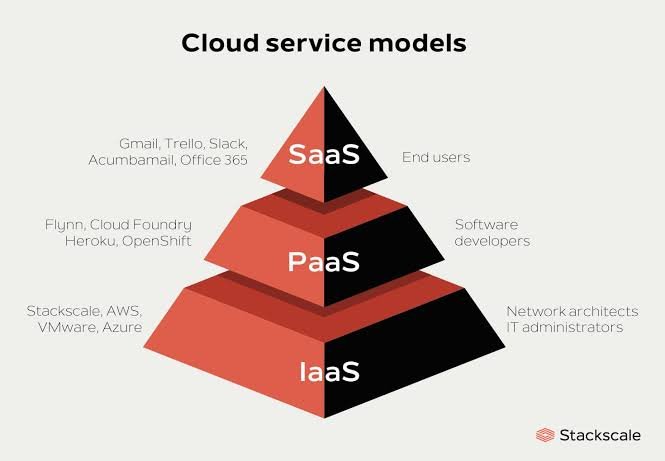
To make cloud services more flexible, providers offer different cloud service models. The three main models are Infrastructure as a Service (IaaS), Platform as a Service (PaaS), and Software as a Service (SaaS).
Each model offers a different level of control, responsibility, and management. Understanding these models helps businesses choose the right cloud solution for their needs.
What is IaaS (Infrastructure as a Service)?
Infrastructure as a Service (IaaS) is the most basic cloud service model. It provides virtualized computing resources such as servers, storage, and networking through the internet.
In this model, the cloud provider manages the physical infrastructure, while the user manages operating systems, applications, and data.
Key Features of IaaS
- Virtual servers and storage
- High scalability
- Pay-as-you-go pricing
- Full control over operating systems and applications
Examples of IaaS
Popular IaaS providers include services from Amazon Web Services, Microsoft Azure, and Google Cloud.
When to Use IaaS
Businesses typically use IaaS for:
- Hosting websites and applications
- Backup and disaster recovery
- Data storage and processing
- Development and testing environments
IaaS is ideal for organizations that want maximum control over their infrastructure without purchasing physical hardware.
What is PaaS (Platform as a Service)?
Platform as a Service (PaaS) provides a complete development environment in the cloud. It includes infrastructure, operating systems, development tools, and databases.
Developers can focus on building and deploying applications without worrying about managing servers or system updates.
Key Features of PaaS
- Built-in development tools
- Automated infrastructure management
- Faster application deployment
- Integrated databases and middleware
Examples of PaaS
Well-known PaaS platforms include Google App Engine, Microsoft Azure App Service, and Heroku.
When to Use PaaS
PaaS is useful for:
- Application development
- Web and mobile app deployment
- API development
- Rapid prototyping
This model helps developers save time by eliminating infrastructure management tasks.
What is SaaS (Software as a Service)?
Software as a Service (SaaS) is the most widely used cloud service model. It delivers fully functional software applications over the internet.
Users access the software through a web browser without installing or maintaining anything on their devices.
Key Features of SaaS
- No installation required
- Accessible from any device
- Automatic updates and maintenance
- Subscription-based pricing
Examples of SaaS
Common SaaS applications include Google Workspace, Microsoft 365, and Salesforce.
When to Use SaaS
SaaS is commonly used for:
- Email services
- Customer relationship management (CRM)
- Collaboration tools
- Online productivity software
This model is perfect for businesses that want ready-to-use software without managing infrastructure or platforms.
Key Differences Between IaaS, PaaS, and SaaS
The main difference between these cloud service models is how much control and responsibility the user has.
- IaaS: Users control operating systems, applications, and data while the provider manages hardware.
- PaaS: The provider manages infrastructure and platforms, allowing developers to focus on applications.
- SaaS: The provider manages everything, and users use the software through the internet.
As we move from IaaS to SaaS, the level of user control decreases while ease of use and convenience increase.