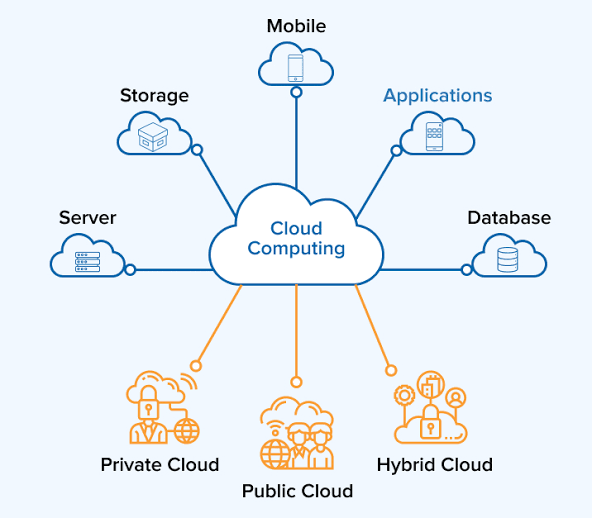
Cloud computing has become the backbone of modern digital infrastructure. From streaming movies and running business applications to storing photos and managing global websites, cloud technology powers countless services we use every day.
However, have you ever wondered how cloud computing actually works behind the scenes?
In this guide, we will explore cloud computing architecture, its core components, and real-world examples so you can clearly understand how this powerful technology delivers scalable and reliable digital services.
What Is Cloud Computing?
Cloud computing is a technology that allows users to store data, run applications, and access computing resources over the internet instead of relying on local computers or physical servers.
Instead of purchasing expensive hardware, businesses and individuals can rent computing power, storage, and software from cloud providers whenever they need it.
Some of the most popular cloud platforms include:
- Amazon Web Services (AWS)
- Microsoft Azure
- Google Cloud Platform
These platforms operate massive data centers that deliver computing resources to users around the world.
Cloud Computing Architecture Explained
Cloud computing architecture refers to the system design that enables cloud services to operate efficiently across global networks. It typically consists of two main parts:
1. Frontend (Client Side)
The frontend is what users interact with directly. This includes:
- Web browsers
- Mobile apps
- Desktop software
- APIs connecting applications to cloud services
For example, when you upload a file to Google Drive, your browser acts as the frontend interface connecting you to the cloud.
2. Backend (Cloud Infrastructure)
The backend is where the actual computing happens. It includes:
- Servers
- Data storage systems
- Virtual machines
- Networking infrastructure
- Security systems
- Databases
This infrastructure is hosted inside large-scale data centers operated by cloud providers.
Key Components of Cloud Computing
Understanding cloud computing becomes easier when you break it down into its major components.
1. Data Centers
Data centers are physical facilities that house thousands of servers, storage systems, and networking hardware. These centers are designed for high performance, security, and redundancy.
They ensure that cloud services remain available 24/7 with minimal downtime.
2. Virtualization Technology
Virtualization is the core technology that makes cloud computing possible.
It allows a single physical server to run multiple virtual machines (VMs), each acting like an independent computer with its own operating system and applications.
This improves:
- Resource efficiency
- Cost optimization
- System scalability
3. Storage Systems
Cloud storage enables users to save and retrieve data from remote servers instead of local devices.
There are different types of cloud storage:
- Object storage
- Block storage
- File storage
These systems ensure secure, scalable, and fast data access across the internet.
4. Networking Infrastructure
Networking connects cloud servers, data centers, and users across the internet.
Key networking technologies include:
- Load balancers
- Content delivery networks (CDNs)
- Firewalls
- Virtual private networks (VPNs)
These tools ensure secure and efficient data transfer worldwide.
5. Cloud Management Software
Cloud platforms rely on advanced management software to control:
- Resource allocation
- Security policies
- Monitoring and analytics
- Auto-scaling systems
This software allows cloud providers to automatically increase or decrease resources based on demand.
How Cloud Computing Works: Step-by-Step
Let us break down the process of how cloud computing works when you use an online service.
Step 1: User Sends a Request
A user opens a website, mobile app, or cloud service through the internet.
Example: Opening Netflix or Google Docs.
Step 2: Request Reaches Cloud Servers
The request is sent to the nearest cloud data center through the internet.
Cloud systems analyse the request and route it to the appropriate server.
Step 3: Processing Happens in the Cloud
Cloud servers process the request by:
- Running applications
- Accessing databases
- Performing computations
Step 4: Response Is Sent Back
After processing, the server sends the result back to the user's device.
This happens within milliseconds, creating a seamless digital experience.
Real-World Examples of Cloud Computing
Cloud computing powers many services we rely on every day.
1. Streaming Platforms
Services like Netflix and Spotify use cloud infrastructure to stream millions of videos and songs globally without interruption.
2. Online Storage Services
Platforms such as Google Drive, Dropbox, and OneDrive allow users to store and access files from any device connected to the internet.
3. Business Applications
Companies run enterprise software like:
- Customer Relationship Management (CRM)
- Accounting software
- Collaboration tools
All hosted on cloud platforms.
4. E-commerce Platforms
Online stores rely on cloud servers to manage:
- Product catalogs
- Payment systems
- Inventory databases
- Customer traffic spikes during sales
Benefits of Cloud Computing Architecture
Cloud computing offers several advantages compared to traditional IT infrastructure.
Scalability
Resources can be increased or reduced instantly depending on demand.
Cost Efficiency
Businesses only pay for the computing resources they use.
Global Accessibility
Users can access cloud services from anywhere with an internet connection.
High Reliability
Cloud providers maintain backup systems and redundancy to prevent service disruptions.
Future of Cloud Computing
Cloud computing continues to evolve with technologies like:
- Artificial Intelligence (AI)
- Edge Computing
- Serverless Architecture
- Hybrid and Multi-Cloud systems
These innovations will make cloud platforms faster, smarter, and more efficient in supporting global digital transformation.